Showing posts with label Eclipse. Show all posts

Thursday, November 1, 2012

JSDoc is more than just documentation (in Scripted)

Recently, we released the Scripted editor for editing your JavaScript. It's still early stages, but our focus on a light-weight and semantically aware editor already has some compelling features. In this blog post, I'll show you how you can use JSDoc in your JavaScript files to provide Scripted with some inferencing help. Since Scripted uses the Orion editor, most of this JSDoc support is also available in Orion.

There are many flavors of JSDoc and there is no standard, but the Google Closure Compiler uses a style that is well-documented, self-consistent, and complete. We use Doctrine as the JSDoc parser, which has a complete understanding of the JSDoc annotations of the Closure Compiler.

Currently, Scripted recognizes a subset of JSDoc tags:

  • @type {type-sig} {optional-doc} specifies the type of a variable declaration
  • @param {type-sig} {param-name} {optional-doc} specifies the type of a function parameter. Parameter annotations are not positional. They must correspond to an actual named argument of the function.
  • @return {type-sig} {optional-doc} specifies the return type of a function

The docs for the Closure Compiler specify many kinds of type signatures. Only a subset are relevant to and supported in Scripted. Scripted recognizes:

  • Simple types, eg- {Window}, {boolean}, {Boolean}
  • Record types, eg- {{myNum: number, myObject}}
  • Function types, eg- {function(arg0:string,arg1:boolean)}
  • Function return types, eg- {function():number}

And of course, type signatures can be combined to produce more complex signatures. The built-in types boolean, number, string, and object can optionally be capitalized, this breaks from the semantics of the closure compiler, but provides more flexibility to programmers. Other kinds of signatures are tolerated, but do not affect the inferred type.

Examples


With this information, we can start showing some examples. Scripted uses typing information for hovers, navigation (e.g., CTRL+Click to navigate to definitions), and for content assist.

Simple @type


Here is a simple JSDoc comment to define a string variable:

Record types


Using a record type signature, you can define the type of an object literal:

Functions


You can specify that a variable is a function, as well as include its parameter names and return types (parameter types are currently ignored for function type signatures). It looks like this:


If you want to declare the types of function parameters, then you should be using the @param annotation, like this:

User defined types


User defined types are recognized as well:

Union types


One possible point of confusion is with union types. They are interpreted by Scripted as whatever the first signature is. So, in the following is interpreted as a string:

Node support


And finally, Scripted's JSDoc support can be combined with its dependency analysis to infer types defined in other modules. This is extremely helpful for node projects where the use of callbacks can obscure the parameter types. In the following example, by specifying the types of the req an res parameters, you can get some meaningful content assist for them:

What's next


There are some more interesting cases that we should handle. A common idiom in JavaScript is to declare constructors using qualified names. Libraries like Dojo and Ext JS. For example, you can define a class name in Ext JS like this:
Ext.define('scripted.Widget', { ... });

And in Dojo:

var Widget = dojo.declare('scripted.Widget', [], { ... });

We could accomplish this using the @typedef annotation or possibly the @constructor annotation.

Additionally, the @lends annotation provides a nice way to specify options and configuration for constructing types and will likely make it into an upcoming version of Scripted.

So?


Using JSDoc in your JavaScript files is a good way to give some extra help to the inferencer, which often has trouble recognizing some of JavaScript's more dynamic features. Scripted is still in its early stages, and is moving ahead quickly. We like feedback. You can send a message to the Google group and fork us on Github.

Wednesday, June 29, 2011

AJDT 2.1.3 Released

The AJDT team is proud to release AJDT 2.1.3. This release is the first one targeting Indigo (Eclipse 3.7) and it contains AspectJ 1.6.12.M1. The update sites are here:

For Indigo:
http://download.eclipse.org/tools/ajdt/37/update

For Helios:
http://download.eclipse.org/tools/ajdt/36/update

Please send any feedback to one of the mailing lists or raise an issue
on Bugzilla.

Groovy-Eclipse 2.5.1 Released

The Groovy-Eclipse team is proud to release Groovy-Eclipse 2.5.1. This release is now available for install using the update sites here:

for Eclipse Indigo:
http://dist.springsource.org/release/GRECLIPSE/e3.7/

for Eclipse Helios:
http://dist.springsource.org/release/GRECLIPSE/e3.6/

In this release, we have continued to work on our DSLD support (and we
ship with some useful DSLD scripts). Additionally, we have a GA
release of the groovy-eclipse-compiler-plugin for Maven. Now that
Indigo has been released, the 3.7 stream of Groovy-Eclipse will become
the main development branch. For now, we will continue to support the
3.6 stream of Groovy-Eclipse and will put out at least one more
release.

You can find all the details at our New & Noteworthy page.

Please send feedback here or raise an issue on our issuetracker.

Friday, June 24, 2011

Vancouver Eclipse Demo Camp 2011

In honor of the Indigo release of Eclipse, I will be hosting the annual Eclipse Demo camp in Vancouver on Monday, June 27. The demo camp is co-sponsored by the Eclipse Foundation, VMWare, and Tasktop.

We're expecting a full house as well as lots of exciting talks, including one on Groovy/Grails support in Eclipse and the SpringSource Tool Suite, a talk from Tasktop, and a talk about the Eclipse Modelling Framework from Ed Merks, the project lead.

If you are in the Vancouver area and interested in attending, please add your name to the wiki:

http://wiki.eclipse.org/index.php?title=Eclipse_DemoCamps_Indigo_2011/Vancouver

Alternatively, contact me directly (or on this blog) and I'll add you myself. Hope to see you there!

Monday, March 7, 2011

eGit in practice

I like Git in theory. Distributed version control has many advantages over non-distributed including local branching, easier task switching, and easier offline work.  However, as an Eclipse user, I find it highly disruptive to drop down to the command line whenever I need to perform any git commands.  Despite its advantages, using git instead of CVS or SVN has felt like a big step backward because of its lack of Eclipse tooling.

Until now, I have only been using git occasionally, and so I could live with the inconvenience.  However, it looks like some of my major projects will be moving to git and so I need to figure out what to do.  I have been eagerly awaiting the eGit tooling to reach a reasonable level of maturity.  I decided to try it out and see how far along it is.


Install and setup


I installed eGit 0.11.3 from the public repository (http://download.eclipse.org/egit/updates) into my SpringSource Tool Suite.  And as expected, the Git Repository perspective was initially empty.  So far so good.

I thought I'd start by cloning the SpringIDE project.  Initially, I tried right clicking in the Git repositories view, and expected that I'd be able to pasted the repository URL directly.  That didn't work.  There is only one option: to paste an existing repository path:


Instead, I used the "clone repositories" command button.  I was able to do what I wanted to, but it was slightly less intuitive than I would have hoped.

Using eGit


After cloning, Git placed the entire repository on my hard drive, which is nice because checking out, exploring, and comparing is much faster than using a traditional VCS.  Performing these operations within Eclipse is just as speedy as doing things like comparing local history.  At this point, I was very impressed.

Then I made a single change to a file and things started going downhill.  After the change, I had to wait about 30 seconds for the '>' to appear in the package explorer next to the changed file (whereas with Subversive and the CVS tooling, this happens what seems like instantaneously):


Then I started playing around... I right-clicked on the file I had just changed and selected Assume unchanged.  Uh-oh!  ClassCastException.  Now, click Assume changed.  IOException.  Apparently, though something worked and I was able to continue with the commit and then view the commit in history.

Next problem: I moved back to the Git Repositories perspective, and I had lost all of the git repositories in the git repositories view.  Re-importing them would not work.  It looked more like the UI had crashed than any data had been lost:


I restarted Eclipse and everything seemed back to normal:


Despite its problems, eGit has a good UI.  The project is clearly following the Eclipse User Interface Guidelines, and I was able to easily transfer my familiarity with Eclipse's CVS and SVN tools to working with git.  This is a strong indicator to me that the project is headed in the right direction even if it is not quite there yet.

And so...


The basic features that I need exist, but after 20 minutes of using, I hit several obstacles.  None of them were insurmountable and the project is usable.  Despite this, I do expect that future releases will be significantly more solid.  I will likely be using eGit for my day to day work, but for now this will be largely for repository and history exploration, rather than for commit and branch management, which I'll probably use the command line for.


EDIT: I raised Bug 339158 and Bug 339159 to track some of the problems I found.

Thursday, October 7, 2010

More on Groovy-Eclipse and Maven

I've had a few requests for the source code for the Groovy-Eclipse integration for maven, as well as a sample project that uses it. You can get both the sample project and groovy-eclipse compiler plugin for maven.

They are packaged as two m2eclipse projects, and it is recommended (although not necessary) to import them into Eclipse to use them.

The groovy-eclipse-compiler project contains the compiler integration. It is a single Java class that calls into the Groovy-enhanced JDT compiler. This maven plugin uses plexus to hook into maven's compiler plugin.

The groovy-eclipse-maven-tests project is a very simple maven project that has a few Groovy and Java classes that interact with each other. If you want to create your own project using the Groovy-Eclipse maven integration, I would recommend starting with this sample project.

Please let me know if you have any problems.

Sunday, June 27, 2010

No more handles?

I manage 4 Eclipse PDE builds on two different build servers. Three days ago, I started getting this same exception when running the JUnit tests for all 4 of the builds:

org.eclipse.swt.SWTError: No more handles [gtk_init_check() failed]
at org.eclipse.swt.SWT.error(SWT.java:3910)
at org.eclipse.swt.widgets.Display.createDisplay(Display.java:863)
at org.eclipse.swt.widgets.Display.create(Display.java:851)
at org.eclipse.swt.graphics.Device.(Device.java:152)
at org.eclipse.swt.widgets.Display.(Display.java:479)
at org.eclipse.swt.widgets.Display.(Display.java:470)
at org.eclipse.ui.internal.Workbench.createDisplay(Workbench.java:532)
at org.eclipse.ui.PlatformUI.createDisplay(PlatformUI.java:161)
at org.eclipse.ui.internal.ide.application.IDEApplication.createDisplay(IDEApplication.java:143)
at org.eclipse.ui.internal.ide.application.IDEApplication.start(IDEApplication.java:88)
at org.eclipse.test.UITestApplication.runApplication(UITestApplication.java:138)
at org.eclipse.test.UITestApplication.run(UITestApplication.java:60)
...


I was pulling my hair out trying to figure out why all four builds would be failing in the same exact way even though they span Eclipse versions (Galileo and Helios), and servers. All links I could track down seemed to imply that the root cause are SWT resources that are not properly disposed.

It turns out that solution was a bit more banal than that. There were no leaks in my code. Instead, this exception occurred because there was no virtual display available on the build servers for running the UI tests. Xvfb had shut down. After a restart of Xvfb, the tests are now running as expected.

Now, why Xvfb would happen to shut down on both servers at the same time still befuddles me, but the problem is fixed. I just hope that the next person who sees this problem doesn't also immediately think there is a resource leak, and pull their hair out to find it.

Saturday, May 15, 2010

Extending Groovy-Eclipse for use with Domain-Specific Languages Part II

A while ago, I wrote an article about how to extend Groovy-Eclipse for domain specific languages. It was always my intention to write a follow-up that included an example project. Thanks to some prodding on the mailing list, here it is, 5 months later. I finally have an example Groovy-Eclipse extension project available.

The code mostly speaks for itself, so if you are interested in how to extend Groovy-Eclipse, first read part I of this article, and then download the example project.

Here is the example plugin project that extends Groovy-Eclipse. Import this plugin into your Eclipse development workspace.

And here is a simple runtime project that uses all of the extensions provided in the plugin project. Import this project into your Eclipse runtime workspace. If you want to create your own project that uses this example, be sure to add the following project nature to your .project file:
org.codehaus.groovy.eclipse.example.nature
Once again, the code speaks for itself, so there is nothing more that I need to say about it. Enjoy!

Monday, April 12, 2010

Groovy-Eclipse for Helios

Today we released our first snapshot of a Groovy-Eclipse build for Eclipse 3.6 (Helios). We haven't set the continuous build system up yet, so for now if you are looking to try it out, you can download the zip here:

http://dist.codehaus.org/groovy/distributions/greclipse/snapshot/e3.6/groovy-update-site-e36.zip

And then point your p2 installer to the downloaded archive. You will then be able to install Groovy-Eclipse. We have only tested on 3.6 M6 and we will continue to ensure that it works on later milestones as they come out.

As always, your feedback is appreciated!

EDIT (June 30, 2010): the zip above is outdated and so I removed it. Please use the update site below instead:

http://dist.codehaus.org/groovy/distributions/greclipse/snapshot/e3.6/

Wednesday, March 17, 2010

AJDT for Helios now available

Just a quick note to let you know that AJDT targeting Helios (Eclipse 3.6) is now available from the following update site:
  http://download.eclipse.org/tools/ajdt/36/dev/update
AspectJ-aware PDE export facilities are currently broken. I am not planning on fixing it. Instead, I have been working with the PDE team on an alternative solution. See Ability to override javac task during pde builds (Bugzilla). I'll write more about this later, but the solution is much more elegant than what is currently available in AJDT for 3.5 and earlier.

Also, as a bonus, this version includes intertype declaration (ITD) -aware Java search. Finally, ITDs are completely first-class citizens in the workspace. I'll write more about this later, too.

Monday, December 14, 2009

Getting GMaven to play nicely with Groovy-Eclipse

There has been a lot of talk on the Groovy mailing list lately about how to get GMaven working with Groovy-Eclipse and coincidentally I saw my friend Mike last night who works at boats.com and he told me that his office has solved this problem. Here is what he told me:


Okay, the first things you will need in your POM file are the GMaven mojo and the GMaven runtime. The dependencies for the mojo seem to be a big buggered out of the box, so you will have to tweak the GMaven runtime dependencies. Here is how you do it:


<dependencies>
<dependency>
<groupId>org.codehaus.groovy.maven</groupId>
<artifactId>gmaven-mojo</artifactId>
<version>1.0</version>
<exclusions>
<exclusion>
<groupId>org.codehaus.groovy</groupId>
<artifactId>groovy-all-minimal</artifactId>
</exclusion>
<exclusion>
<groupId>org.codehaus.groovy.maven.runtime</groupId>
<artifactId>gmaven-runtime-1.5</artifactId>
</exclusion>
</exclusions>
</dependency>
<dependency>
<groupId>org.codehaus.groovy.maven.runtime</groupId>
<artifactId>gmaven-runtime-1.6</artifactId>
<version>1.0</version>
</dependency>
</dependencies>


Next is your build configuration. Eclipse will need to be able to find your Groovy source files, so you will need to add your Groovy source as an explicit resource directory.

The mvn:eclipse plugin will also need to add the Groovy nature to your project.

You will also need to add directives for the GMaven plugin. This is where you will have to do a manual tweak: when using mvn to build your project, gmaven generates some stubs for your groovy code before the java code compiles, so that any java->groovy dependencies will be fulfilled. The Groovy code is then compiled and will overwrite the .class files from the previous step. This breaks things in eclipse, since if you attempt to execute code in your workbench, eclipse sees the stubs and somehow their .class files are what end up in your binary output directory.

Therefore, if you want to execute a gmaven project from Eclipse, you simply need to comment out the stub generation directive and delete any generated stub classes. This is what it looks like:


<build>
<resources>
<resource>
<directory>src/main/groovy</directory>
</resource>
</resources>
<plugins>
<plugin>
<artifactId>maven-eclipse-plugin</artifactId>
<configuration>
<additionalProjectnatures>
<projectnature>
org.eclipse.jdt.groovy.core.groovyNature
</projectnature>
</additionalProjectnatures>
</configuration>
</plugin>
<plugin>
<groupId>org.codehaus.groovy.maven</groupId>
<artifactId>gmaven-plugin</artifactId>
<version>1.0</version>
<executions>
<execution>
<goals>
<!--
<goal>generateStubs</goal>
-->
<goal>compile</goal>
<!--
<goal>generateTestStubs</goal>
-->
<goal>testCompile</goal>
</goals>
</execution>
</executions>
</plugin>
</plugins>
</build>

The result is a groovy/java project that can be managed with maven but can be transparently developed (and more importantly, debugged!) in Eclipse.

There is one minor issue that has come up however: GMaven 1.6 stub generation is broken for enums: it generates public constructors, which do not compile. I submitted an issue to codehaus (GMAVEN-51), and apparently the workaround is to use the gmaven 1.7 runtime. I haven't tried it yet, since things are working okay for us thus far.

Mike


So, it does seem like there is a bit of a problem with stubs being recognized by Groovy-Eclipse when they should not be. The solution would be to generate the stubs in a directory that is not seen by Eclipse, rather than in the default output directory. But not knowing much about GMaven (or Maven for that matter) works, I don't know how feasible this is. Can anyone think of a better solution?

Friday, November 27, 2009

New cross-language refactoring support for Groovy-Eclipse plugin

Thanks to the work of Michael Klenk and his students at the Institute for Software in Switzerland, the Groovy-Eclipse plugin now has cross-language refactoring support for renaming. Its use is seamless. Let me give you an example.

Let's start with a simple Java file and a simple Groovy file:

before

You can rename the field in the Java class:

during1

This will perform the standard Java refactoring on all Java classes in your projects. Additionally, the refactoring will be performed on your groovy classes. If there are any ambiguous references to the Java field, the following dialog will open up allowing you to choose which references should be refactored:

choose

And the result is what you would expect:

after

The refactoring can be initiated from the Groovy side as well:

groovyrefactor_menu

As you can see, extract method an inline method are two other refactorings supported in Groovy code.

This functionality is currently available in the latest snapshot build of Groovy-Eclipse for Eclipse 3.5, available from the following update site:
   http://dist.codehaus.org/groovy/distributions/greclipse/snapshot/e3.5/


Please send any questions or problems to the mailing list. We're happy to help. Enjoy!

Monday, November 16, 2009

How type inferencing for Groovy in Eclipse is leading to all sorts of Groovy goodness

Of all of the recent improvements of Groovy-Eclipse since M1 has been released, the groovy type inferencing engine is the most pervasive and powerful. This inferencing engine is able to take a groovy file or code snippet and infer the type of any or all of its expressions. It now forms the core of several of the most prominent features of Groovy-Eclipse. Everything that I describe here is currently available in the latest snapshot release of Groovy-Eclipse for Eclipse 3.5 and the update site is here:
http://dist.codehaus.org/groovy/distributions/greclipse/snapshot/e3.5


In this post, I am going to describe how the inferencing engine is currently used in Groovy-Eclipse and then I will dive a deep and describe how it is implemented. I'll end the post by describing our plans for immediate the future.

What type inferencing is used for


Underlining statically indeterminate references


The Groovy editor now underlines all references that cannot be determined while editing. This happens in a background thread while you type. So, the following code (notice the mispelling of asImmutable):


def aList = []
def otherList = aList.asImmutabl()
otherList.asImmutable()


...will appear in the editor like this...

underline

...and when the typo is fixed, the underlines go away...

nounderline

Code is re-analyzed after every keystroke (well, actually, it is after every keystroke that is followed by 500ms of no keystrokes). The type of every reference in the file is looked up using the inferencing engine. Every reference that cannot be found is considered to be unknown and will be underlined.

Of course, Groovy being a dynamic language, not all references can be statically linked to a type (other than Object). This is especially the case when working with DSLs (such as Grails) that use metaprogramming to add new methods and fields to existing types. Later, I'll describe our plans for extensibility.

Search


Inferencing is used for Java Search as well. Using the search short cut (CTRL-Shift-G or CMD-Shift-G on Mac) or running search from the Java Search dialog, references from and to Groovy code snippets can be located. However, there are some difficulties here. Compared to Java, Groovy is quite a bit more flexible in the ways that fields and methods can be referenced. For example, this field is assigned a closure and referenced as if it were a method:

class Foo {
def x = { print it }
}

x("Hello!")


And this method is referenced in a way that is statically indistinguishable from a field:


class Foo {
def x() { print "Hello!" }
}

x


Furthermore, the spread operator and the use of default parameters makes the Java way of determining which method or field is referenced impossible. So, Groovy search is significantly more liberal than Java search in what it considers a search match. If a reference corresponds to any field, method, or property in the declaring type (regardless of parameter count and whether it is accessed as a field or method), then the match is considered successful. This leads to the following scenarios.

1. Performing search on the field declaration finds field references here:
searchForField

2. Performing search on the method declaration finds exactly the same references:
searchForMethod

And, notice that references attached to the wrong type are not considered a match.
searchNoResults

Content Assist


Most of the internals of Groovy-Eclipse has been rewritten since the previous 1.5.7 release. The most recent rewrite is of content assist. Although the previous version worked (usually), there was always a noticeable lag while waiting for the content assist window to appear. This previous implementation of content assist used a combination of Java classloading and Groovy AST matching in order to find all completion proposals available at a given location, which was both messy and slow. Now, we have hooked into the inferencing engine and have completely rewritten proposal generation with extensibility in mind. And we have made some remarkable improvements in performance.

Using the following code snippet I performed content assist 5 times under the old implementation and the new and took the average of the last 3 of each:


def x
x.hasProperty("foo").


Old implementation2315 milliseconds
New implementation8 milliseconds


That's right...there is a 3 orders of magnitude speed up under the new implementation, making content assist a much more pleasant feature to use. But please note that this is just the time for calculation of the proposals and it does not include the time required to actually pop up the window.

Open declaration


The implementation of open declaration (or code select as it is called in JDT because it is a general mechanism to determine what the current selection refers to and is also used for things like calculating hovers) also uses inferencing. Pressing F3 whenever the selection is any form of "navigateToMe" in the following code, the expected declaration will open:

navigateBefore ---> navigateAfter

Although Groovy-Eclipse M1 used type inferencing for code select, it was using the inferencing from content assist and was subject to the same mistakes, duplicate answers, and slowness that content assist had.

How it works


The inferencing engine has unified the implementation of several of Groovy-Eclipse's most widely used features. With this unification, we have been able to significantly reduce the amount of duplicated code, improve performance, and plan for extensibility.

There are four interacting components of the inferencing engine:


  1. The Abstract Syntax Tree (or AST): this is an abstract representation of the syntax of a groovy file expressed hierarchically. The code to work on can be obtained either from the disk, or it can be the latest in memory. The AST is generated by the Groovy compiler based on the current state of the editor whenever Eclipse is otherwise idle.

  2. The type inferencing visitor: this visitor walks the AST (i.e., uses a visitor pattern to visit every AST node) and delegates to the type lookups and the requestor described below. A new visitor is created for each call to the inferencing engine.

  3. The type lookups: these objects lookup the type information of a particular expression using whatever mechanism they require. They can store and retrieve information about types in a way that all other lookups can use. In this way, each lookup can do what it can and coordinate with other lookups where required. Several default lookups are provided including a simple lookup, an inferencing lookup (that stores information about types via assignment expressions), and a category lookup (that looks up types in Groovy categories). Type lookups are created from a registry on each call to the inferencing engine.

  4. The requestor: this is the object that collects the type information determined by the lookups. The requestor is general and can be used as a way to store the types of all expressions, lookup the type of a particular expression, or look for expressions with unknown types (just to name a few uses). The requestor is created by client code and past to the visitor to start the inferencing process.


The following diagram shows process and how the different pieces work together:

arch


  1. The visitor visits an AST expression node

  2. The visitor sends this expression to the type lookups.

    • each lookup responds with a type and its confidence in that type (ie, exact, potential, inferred...), or null, if it cannot find a type

    • a lookup may additionally store information in a scope object that is passed around to other lookups so that information can be shared between them


  3. The result of the lookup is sent to the requestor

  4. The requestor processes the result and may choose to end the visit or continue.

  5. If required, the visitor will continue to visit the rest of the abstract syntax of the Groovy file


What's next


One of the core design goals of the inferencing engine is extensibility. The inferencing engine must be extensible in two ways. First, it must be usable to help support new features such as quick fixes and refactoring. Also, DSLs, (most notably Grails) must be able to extend inferencing with their own type lookups. It should be apparent through the description of the variety of ways that the engine is currently used that it versatile and can become the core implementation of any number of new Groovy-Eclipse features. As for DSL extensibility, that has not yet been implemented, but the stubs are available. Other DSLs will need to implement their own type lookup, but there is currently no way for these new lookups to be plugged in. Fortunately, it will be possible to use Eclipse's plugin architecture here and this will be the subject of my next blog post (after it gets implemented).

Tuesday, September 29, 2009

Groovy-Eclipse plugin now supports Eclipse 3.5.1

The Groovy-Eclipse plugin can now be installed into Eclipse 3.5.1. As always, the update site is here:

http://dist.codehaus.org/groovy/distributions/greclipse/snapshot/e3.5/

You can stop reading here if you don't care how I got this to work, or why I am a little bit surprised by this.

The Groovy-Eclipse plugin uses a feature patch on the JDT core bundle in order to achieve a high level of integration with JDT. Typically, feature patches can only apply to a specific version of a feature (e.g., 3.5.0.v20090527-2000-7r88FEeFJePyvYeA33DjZ_c1 or some ugliness). This means that Groovy-Eclipse, until recently could only install in a specific version of Eclipse, the one that ships the JDT feature version 3.5.0.v20090527-2000-7r88FEeFJePyvYeA33DjZ_c1. However, Andrew Niefer describes how to get around this by editing the content.xml file to widen the range that the patch applies to. Excellent stuff, and lucky for me, because I didn't want to branch the Groovy-Eclipse code base every time a new service release of Eclipse comes out.

Unfortunately, his instructions were not entirely accurate. Andrew mentions that the range attribute in the <patchscope> element needs to be widened in order allow the patch to be installable on multiple versions. I tried exactly what he suggested, but could not get my patch to install in both 3.5.0 and 3.5.1. After a little bit of exploration, I found that I also needed to change the range attribute in the <lifecycle> element.

All this meant was adding a single line to my ant script, to be executed after the p2 repository is generated:

    
<replace file="${updateSiteDir}/content.xml"
summary="yes" token="${orig.jdt.feature.version.range}"
value="${new.jdt.feature.version.range}"/>

And this turned out to be very simple. Thanks for the hint!

Wednesday, June 3, 2009

Update on Greclipse 2.0 (Groovy support in Eclipse)

Today, I decided to run EclEmma on the Groovy-Eclipse plugin test suite. Shockingly, I found that JUnit support, content assist, and code navigation are completely test-fress. So, I took a stab at creating a solid and flexible test infrastructure that makes it easy to write plugin tests, especially ones that exercise the Java model.

How did I do this? I did it by hooking into existing JDT functionality, just like I have been doing for the rest of my work on Greclipse. I downloaded the JDT core tests from CVS and used what I needed. Now, I can write extremely concise tests that exercise the code I want it to. For example, I wrote the following test case that tests code selection on a closure in a groovy script (i.e., this is the code that is executed when you perform Open Declaration in an editor):


public void testCodeSelectClosure() throws Exception {
IPath projectPath = createGenericProject();
IPath root = projectPath.append("src");
String contents =
"def x = {\n"+
"t -> print t\n"+
"}\n"+
"x('hello')\n";
env.addGroovyClass(root, "Script", contents);
GroovyCompilationUnit unit = getGroovyCompilationUnit(root, "Script.groovy");
IJavaElement[] elts = unit.codeSelect(contents.lastIndexOf('x'), 1);
assertEquals("Should have found a selection", 1, elts.length);
assertEquals("Should have found local variable 'x'", "x", elts[0].getElementName());
}


I have written many tests for JUnit support (or is that GUnit?), and some for code selection. I still need to work on content assist. So, I can now be confident that as we make changes towards the 2.0 release, we are not sliding back in functionality. There is a lot of good work that has already been put into the plugin (including groovy-aware type inference for content assist) and we need to make sure that this does not regress as we go forward.

Sunday, May 17, 2009

Is it Groovy or is it Java? Do we really care?

Well, I care, but the editor doesn't. Following up on the work that Andy Clement has done to modify the JDT compiler so that it can process Groovy as well as Java, I've spent the last few weeks working on editor support for Groovy in Eclipse. Yes, there is already an Eclipse plugin for Groovy, but this particular plugin is tied to a split compiler (JDT for Java files and Groovy compiler for Groovy files). And I wanted to see if we could use the joint compiler to drive Groovy tool support.

So far, with minimal changes it seems that it is possible. I've been able to implement much of the standard Java editing support for Groovy files (e.g., open declaration, search, syntax highlighting, content assist, etc) as long as the editor is passed the right kind of structure.

Let's recap what Andy has done so far...
After getting a little intro to groovy joint compilation (and groovy compiler structure) from Jochen Theodorou, I wondered how hard it would be to go about things slightly differently. Let the Eclipse JDT compiler take control of building a mixed code base but whenever it needed to deal with groovy - call the groovy compiler. If JDT could take control I could see all sorts of things 'just working' in Eclipse, problems upon which we are still expending large amounts of efforts to try and solve for AspectJ. If I could just plug groovy type reference resolution and classfile generation into JDT correctly then references between java and groovy artifacts would work and JDT would ensure incremental compilation worked, even across restarts of eclipse (this latter problem still hasn't been solved for AspectJ).
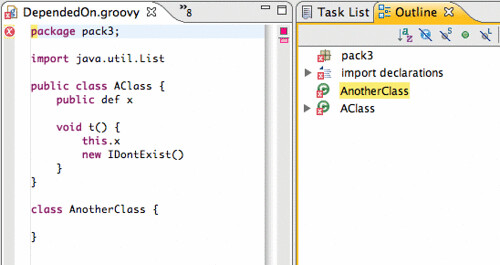
So originally, this worked great for joint compilation, but as soon as you try to open this in an editor, things just don't behave correctly...


The outline view is out of order, problems and errors don't show up where you expect them to, and source code navigation is broken.

After a bit of mucking around, I found that there is a single root to this problem: source locations. The JDT tooling and the editor is very specific about the source locations that it requires. JDT requires the start and end locations of identifiers, method and type bodies, and all declarations. However, the Groovy compiler (which builds its AST from antlr), only provides line and column information for AST nodes. Although it is possible to translate from line/column to file offset, offsets for identifiers are lost.

And, with a little bit of hacking, I was able to recreate source offsets for field, method, and class names and declarations. It turns out that this is enough to spring to like much of your favorite editor functionality:


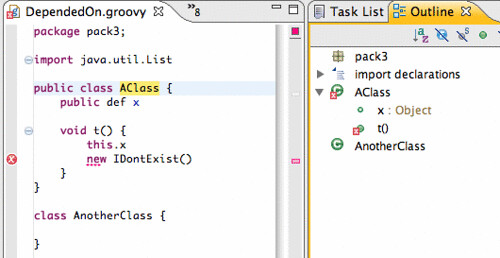
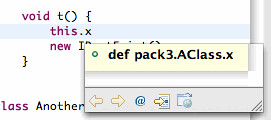
Same program, same error as before, but now the outline view is correct, the error marker is in the proper location,* "Open Declaration" and searches navigate to the proper location. And even source hovers work:


So, let's take a deeper look at how this works.

The JDT uses three representations of abstract syntax of a Java file. There is the compiler AST, which is used to generate byte code and perform analysis. There is DOM (document object model) AST, which is used for refactoring and source code manipulation. And, there is the model (the IJavaElement hierarchy), which is more abstract, and is used for navigation and in places like the Package Explorer and Outline views.

There is also support to translate from the compiler AST to either of the other two ASTs. Earlier, I described (or rather Andy described) the way JDT can be used to drive the joint compilation of Groovy source code. The result is a JDT compiler AST with (crucially) the right source code offsets. This, when translated to the right kind of AST at the right time, can be fed to the different parts of JDT that require it. And, thereby, things just work.

A few caveats, of course. Right now, we are only generating a minimal compiler AST (class, method and field declarations only---method bodies are ignored for now). This, however, does seem to be enough for this basic functionality. Also, there are some major differences between Groovy and Java syntax (closures, regular expressions, and lists operations). We are currently sidestepping this problem by ignoring method bodies, statements and expressions.

At some point, however, we are going to have to tackle these loose ends. We will need to be more complete about our ASTs and fill in method bodies (this part is *just* lots of coding). And also, we will need to figure out how to translate Groovy-specific syntax into JDT AST, probably by sub-classing the existing API (this will require some thorough design work *and* lots of coding). So, there is still a lot of work to be done.

What does this mean? Well for one thing it means that the implementation of the Groovy editor is just this:


public class GroovyEditor extends CompilationUnitEditor {
private GroovyImageDecorator decorator = new GroovyImageDecorator();

@Override
public Image getTitleImage() {
return decorator.decorateImage(null, getEditorInput().getAdapter(IFile.class));
}
}

Yes, it is just a minimal subclass of the standard CompilationUnitEditor that merely ensures that the icon in the title bar indicates Groovy, not Java.

So, who cares if it's Groovy or Java? Certainly not the editor.

* There are currently Groovy compiler limitations with error reporting in that error locations only include the character or two of the error.

Tuesday, March 17, 2009

Aspects Everywhere: Using Equinox Aspects to Provide Language Developers with Deep Eclipse Integration...

...and other EclipseCon talks.

To shamelessly self promote, I wanted to mention my EclispeCon talk entitled Aspects Everywhere: Using Equinox Aspects to Provide Language Developers with Deep Eclipse Integration. It is about how we (the AJDT team) have used AspectJ and Equinox Aspects to overcome the limitations of JDT and make it more extensible to third parties.

You may want to check this out if:
  • You use AspectJ or AJDT
  • You are interested in using Equinox Aspects and want to find out how it can be used
  • You are a language developer who wants to integrate tooling support into Eclipse and JDT
No knowledge of AspectJ is required for this talk.

And if you are interested in anything Spring or AspectJ, please join us for our Bof: Spring on Eclipse: AspectJ, STS, and SpringIDE.

Some other talks that I am planning on attending are:
There are so many excellent talks that it is difficult to choose what to go to. It is going to be a great conference.

Monday, March 2, 2009

AJDT 1.7 pre-release for Eclipse 3.5

In time for EclipseCon, we have made a pre-release of AJDT 1.7 for Eclipse 3.5 available to install. You can find it at the following update site:

  http://download.eclipse.org/tools/ajdt/35/dev/update


Currently, AJDT 1.7 is largely the same as AJDT 1.6, with the exception of the changes required so that it will run on Eclispe 3.5. The two versions will continue to be developed in unison until well after the final release of AJDT 1.7, which will coincide with the Galileo release.

Please report any issues you have here or on bugzilla. Enjoy!

Thursday, February 12, 2009

Extending JDT Part I

In my last post, I described some limitations of JDT, and how it is Java-centric and does not support other Java-like languages such as AspectJ, Scala, and Groovy that compile to Java byte code. In this post, I will show you how the AJDT project has made JDT more extensible by using AspectJ to weave into the Eclipse framework in a way that is elegant, generic, and Eclipse-friendly.

I will start by describing a particular limitation of JDT: that Java-like languages are not able to plug in their own variants of the ICompilationUnit class. Then I will describe the how AJDT uses AspectJ and some factory methods to produce custom ICompilationUnits for AspectJ files. Finally, I will describe how we packaged up this functionality in an extension point so in a way that is generic and consumable by other development tools.

ICompilationUnit


An ICompilationUnit "represents an entire Java compilation unit", according to its JavaDocs. It is part of the IJavaElement hierarchy. An IJavaElement supplies a "common protocol for all elements provided by the Java model." The last lines of both JavaDocs for these elements are crucial: "@noimplement This interface is not intended to be implemented by clients." ICompilationUnits are starting point for much of JDT's functionality, including refactoring, content assist, indexing, and eager parsing.

This leaves us in a quandry: Java-like languages must plug into the Java model through creating custom ICompilationUnits if they are to be compatible with JDT, but ICompilationUnit is not allowed to be sub-classed.

Well, just because the JavaDoc says @noimplement, doesn't mean that we can't implement. It really just means that we do so at our own risk, and this is something that AJDT has been doing for years in the AJCompilationUnit class. The problem is not the difficulty of implementing ICompilationUnit.

The Real Problem


The real problem is the lack of control over instantiation of ICompilationUnits. ICompilationUnits are instantiated deep within the framework, in ways that are opaque to third party plugins. What we really want is to have some kind of factory that provides the correct kind of ICompilationUnit for each file. For our purpose, it is sufficient that *.aj files correspond to AJCompiltionUnit and *.java files correspond to CompilationUnit.

This sounds like a job for AspectJ! AspectJ allows us to intercept creations of CompilationUnit objects and determine if a different kind of object should be created instead.

The Solution


As a first pass, we wrote this code:


pointcut compilationUnitCreations(PackageFragment parent, String name, WorkingCopyOwner owner) :
call(public CompilationUnit.new(PackageFragment, String, WorkingCopyOwner)) &&
within(org.eclipse.jdt..*) &&
args(parent, name, owner);

CompilationUnit around(PackageFragment parent, String name, WorkingCopyOwner owner) :
compilationUnitCreations(parent, name, owner) {

String extension = findExtension(name);
if (extension.equals(".aj") {
return new AJCompilationUnitProvider().create(parent, name, owner);
}
return proceed(parent, name, owner);
}


Don't worry if you are unfamiliar with AspectJ, what this snippet does is fairly straight forward. The compilationUnitCreations pointcut identifies a set of points in the execution of the program. In this case, compilationUnitCreations identifies all locations where CompilationUnit objects are constructed. Beneath that, is an around advice declaration. It describes what to do at the pointcut instead of creating a CompilationUnit object. If the file extension is *.aj, then an AJCompilationUnit object is created. Otherwise, a standard CompilationUnit is created.

This is very nice. Using this AspectJ code, the creation of CompilationUnits has been delegated to the aspect, which can now inject AspectJ elements into the Java model. This opens up a world of functionality to AJDT that had been closed. For example, with this simple aspect, the renaming, moving, organize imports, and other kinds of code clean up and refactorings just work. No more ugly exceptions when you try to do these kinds of things.

However, there are still a couple of considerations with this implementation:


  1. It is now our responsibility (i.e., AJDT's) to ensure that the pointcut matches through future versions. For example, a later version of Eclipse may add an argument to the CompilationUnit constructor. AJDT needs to stay on top of this. Not a problem. Unit tests are your friends. We have tests for each of our aspects that ensure they continue to provide the expected functionality as Eclipse evolves. This is no different from the rest of our test suite which helps ensure that AJDT's use of internal Eclipse APIs doesn't break in new versions of Eclipse.


  2. This implementation works for AJDT, but what about other Java-like languages that require the same kind of JDT integration? For this, we can utilize one of the Eclipse platform's strengths$mdash;its extensible plug-in architecture.


Our second (and current) implementation of this aspect is as follows:


pointcut compilationUnitCreations(PackageFragment parent, String name, WorkingCopyOwner owner) :
call(public CompilationUnit.new(PackageFragment, String, WorkingCopyOwner)) &&
within(org.eclipse.jdt..*) &&
args(parent, name, owner);

CompilationUnit around(PackageFragment parent, String name, WorkingCopyOwner owner) :
compilationUnitCreations(parent, name, owner) {

if (inWeavableProject(parent)) {
String extension = findExtension(name);
ICompilationUnitProvider provider =
CompilationUnitProviderRegistry.getInstance().getProvider(extension);
if (provider != null) {
try {
return provider.create(parent, name, owner);
} catch (Throwable t) {
JDTWeavingPlugin.logException(t);
}
}
return proceed(parent, name, owner);
}


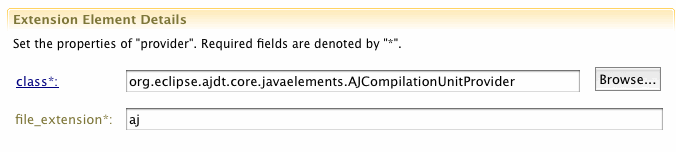
The AspectJ part of the snippet is the same as before. The difference is in the advice body. Instead of calling the AJCompilationUnitProvider factory method directly, there is a call to the CompilationUnitProviderRegistry, which has a mapping from file extensions to ICompilationUnitProviders. A plugin can register its own ICompilationUnitProvider by using the org.eclipse.contribution.weaving.jdt.cuprovider extension point. It looks like this:


One benefit of this implementation is that it extends JDT behavior in a way that uses common Eclipse mechanisms—the extension point. This allows other plug-ins to extend in a well-defined and structured manner. This is the approach that the Scala development tools has chosen to follow, and other language development tools are on the way.

A second of the benefit of this approach is that the consumer of the org.eclipse.contribution.weaving.jdt.cuprovider extension point does not need to be aware of the underlying aspect-oriented implementation. From the consumer's point of view, this extension point can be extended just like any other extension point. No understanding of AspectJ or AOP is required to actually use this extension point.

This is how it is possible to make JDT extensible to other languages in a simple and structured way. However, experienced AspectJ programmers may be confused at this point. Eclipse is built on an OSGi framework. Compile time weaving is not possible because JDT is already installed on a user's machine by the time AJDT is installed. And load time weaving is not possible because it cannot handle an OSGi environment. In a future post, I will describe the Eclipse Weaving Service, which is built on top of Equinox Aspects, that allows plugins to weave into Eclipse.

Wednesday, February 4, 2009

JDT won't do that!

AspectJ is a language that is very close to Java, but it isn't Java. One might expect that since AspectJ is an extension of Java, Eclipse tooling for AspectJ would just be an extension of the Java Development Tools. But it's not that easy. This post describes the problems that we have faced when integrating AspectJ tooling into Eclipse, and motivates a solution that I will elaborate on in future posts.

JDT has not been engineered to be extensible, and rightly so. It is a set of tools that are finely tuned towards making the Java development experience as smooth and convenient as possible. Focusing on extensibility would be to the detriment of the JDT users who program in Java only.

However, this makes life difficult for us tool developers. Users expect high quality tooling for Java-like languages (i.e., languages that run on the JVM) because that is the bar set by JDT. Furthermore, they want tooling that integrates seamlessly with Java tooling. But, JDT won't do that! So, how can we provide good programmer experience in AJDT?

We want to make editing AspectJ look and feel as much like editing Java where it makes sense, and at the same time provide additional functionality so that the user is aware of AspectJ-specific issues. Up until AJDT 1.6.2, there have been limited options to integrate with JDT.

One example of successful integration is the AspectJEditor, which behaves mostly like JDT's CompilationUnitEditor, providing eager error detection, syntax highlighting, content assist, some refactoring support, etc.


The AspectJEditor should be a subclass of the CompilationUnitEditor, But the CompilationUnitEditor is not public API and AJDT really shouldn't be touching it. Or, at least, the responsibility is on us to maintain compatibility in future versions. In addition to using private APIs, the AspectJEditor uses some reflection to access private fields of its super class and copies some code, where reflection isn't practical. Through this combination of techniques, we have been able to largely implement JDT's behavior in AJDT. But, there is some functionality that we want AJDT to provide, but is not possible using private APIs, reflection, or code copying.

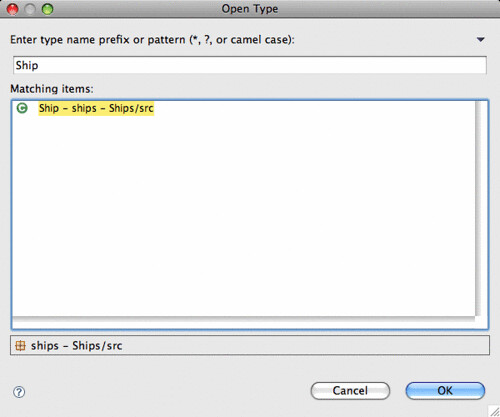
Let's take a look at the Open Type Dialog.


We would really like to see our aspect types in the standard Java Open Type Dialog. But this is unfortunately not possible. There is no API (public or private) that we can use to do this. Even the use of reflection or code copying will not help. What we really need is to gain access to JDT's Java indexer and somehow convince it to index aspect files.

This is a big problem, and one that we have run into many times during our development of AJDT. JDT is not engineered to be compatible with Java-like languages. But, tools for languages such as Groovy, Scala, and JRuby are gaining in popularity and require the same kind of JDT integration that is just not available. There is a long standing JDT bug to address this, but it does not seem like it will be fixed any time soon.

However, there is a solution! Since AJDT 1.6.2, we have been able to provide deep integration with JDT by using AspectJ on JDT itself. We are using Equinox Aspects to weave into the platform and expose functionality in a structured way through the use of Eclipse extension points. In future posts, I will describe how we have designed our JDT weaving service to expose otherwise inaccessible functionality in JDT and how this weaving service is generic enough to be used by tool developers for other languages.

You can also hear more about this at my EclipseCon talk: Aspects Everywhere: Using Equinox Aspects to Provide Language Developers with Deep Eclipse Integration.