Wednesday, May 27, 2009

Push in refactoring for AJDT

I just finished implementing the new Push In refactoring for the AJDT plugin, available in the latest dev build.

Essentially, the refactoring pushes intertype declarations into their target types. So, when a push in refactoring is applied to the following aspect and class:


aspect Foo {
int Bar.x;
declare parents : Bar implements I;
declare @type : Bar : @Baz;
}

class Bar { }


the result is:


@Baz
class Bar implements I {
int x;
}


The Foo aspect is deleted because it is empty.

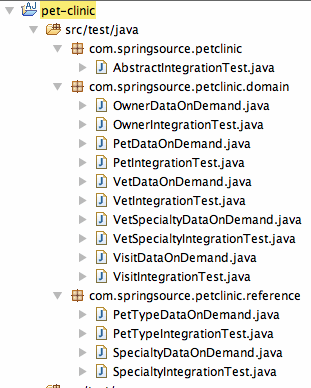
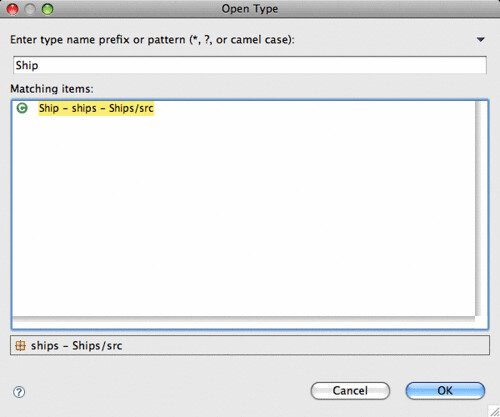
It is simple to use. Select the ITDs or set of ITDs that you want to push in. You can select an entire project, source folder, or package to push all of its ITDs into the target types:


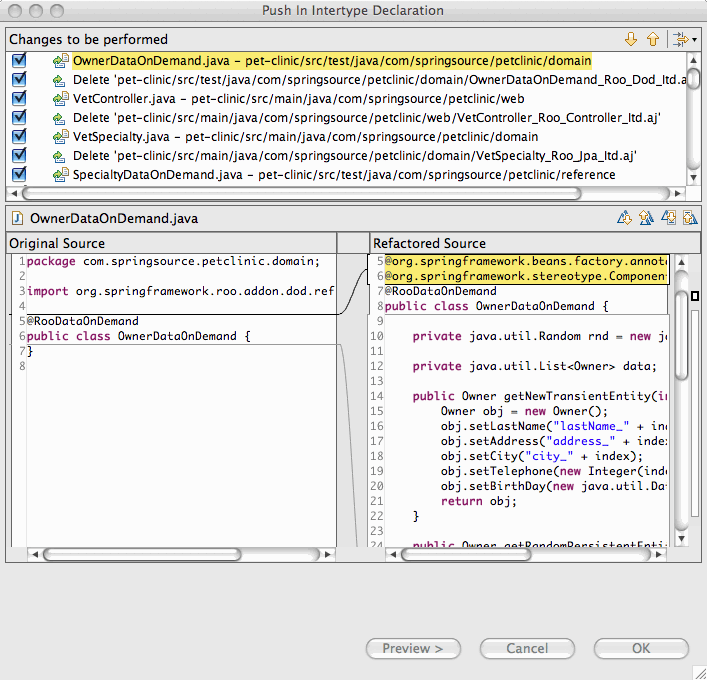
And then follow the wizard:


...and...


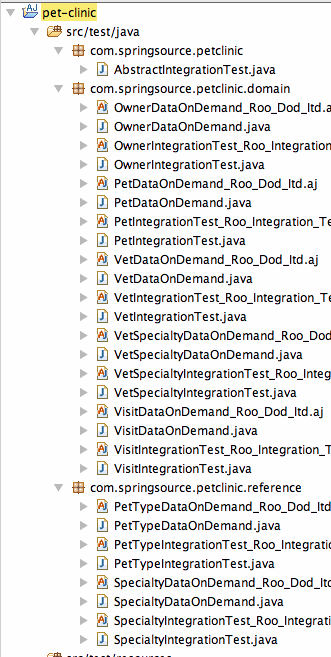
The result is that all ITDs have been successfully pushed in and all aspects that are made empty because of this refactoring have been deleted.


And undo works, too:


It is also possible to execute the refactoring from an editor. Just select all or part of the ITD you want to push in. However, the command itself is in a different sub-menu:


Please try it out and let me know if it works for you. We are working on adding more refactorings to AJDT. Next on the list is the analogous refactoring pull-out.

Sunday, May 17, 2009

Is it Groovy or is it Java? Do we really care?

Well, I care, but the editor doesn't. Following up on the work that Andy Clement has done to modify the JDT compiler so that it can process Groovy as well as Java, I've spent the last few weeks working on editor support for Groovy in Eclipse. Yes, there is already an Eclipse plugin for Groovy, but this particular plugin is tied to a split compiler (JDT for Java files and Groovy compiler for Groovy files). And I wanted to see if we could use the joint compiler to drive Groovy tool support.

So far, with minimal changes it seems that it is possible. I've been able to implement much of the standard Java editing support for Groovy files (e.g., open declaration, search, syntax highlighting, content assist, etc) as long as the editor is passed the right kind of structure.

Let's recap what Andy has done so far...
After getting a little intro to groovy joint compilation (and groovy compiler structure) from Jochen Theodorou, I wondered how hard it would be to go about things slightly differently. Let the Eclipse JDT compiler take control of building a mixed code base but whenever it needed to deal with groovy - call the groovy compiler. If JDT could take control I could see all sorts of things 'just working' in Eclipse, problems upon which we are still expending large amounts of efforts to try and solve for AspectJ. If I could just plug groovy type reference resolution and classfile generation into JDT correctly then references between java and groovy artifacts would work and JDT would ensure incremental compilation worked, even across restarts of eclipse (this latter problem still hasn't been solved for AspectJ).
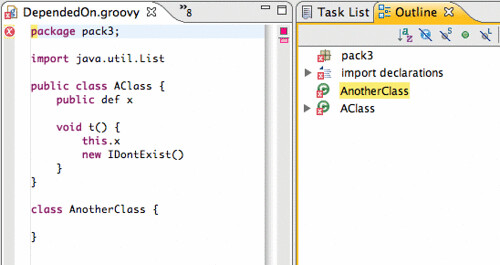
So originally, this worked great for joint compilation, but as soon as you try to open this in an editor, things just don't behave correctly...


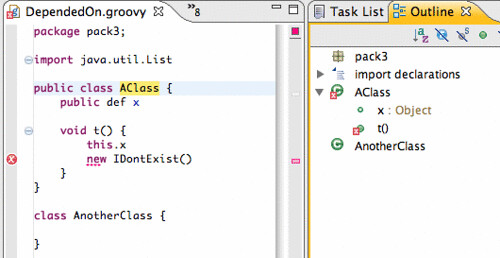
The outline view is out of order, problems and errors don't show up where you expect them to, and source code navigation is broken.

After a bit of mucking around, I found that there is a single root to this problem: source locations. The JDT tooling and the editor is very specific about the source locations that it requires. JDT requires the start and end locations of identifiers, method and type bodies, and all declarations. However, the Groovy compiler (which builds its AST from antlr), only provides line and column information for AST nodes. Although it is possible to translate from line/column to file offset, offsets for identifiers are lost.

And, with a little bit of hacking, I was able to recreate source offsets for field, method, and class names and declarations. It turns out that this is enough to spring to like much of your favorite editor functionality:


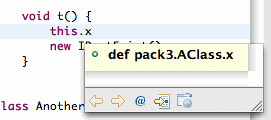
Same program, same error as before, but now the outline view is correct, the error marker is in the proper location,* "Open Declaration" and searches navigate to the proper location. And even source hovers work:


So, let's take a deeper look at how this works.

The JDT uses three representations of abstract syntax of a Java file. There is the compiler AST, which is used to generate byte code and perform analysis. There is DOM (document object model) AST, which is used for refactoring and source code manipulation. And, there is the model (the IJavaElement hierarchy), which is more abstract, and is used for navigation and in places like the Package Explorer and Outline views.

There is also support to translate from the compiler AST to either of the other two ASTs. Earlier, I described (or rather Andy described) the way JDT can be used to drive the joint compilation of Groovy source code. The result is a JDT compiler AST with (crucially) the right source code offsets. This, when translated to the right kind of AST at the right time, can be fed to the different parts of JDT that require it. And, thereby, things just work.

A few caveats, of course. Right now, we are only generating a minimal compiler AST (class, method and field declarations only---method bodies are ignored for now). This, however, does seem to be enough for this basic functionality. Also, there are some major differences between Groovy and Java syntax (closures, regular expressions, and lists operations). We are currently sidestepping this problem by ignoring method bodies, statements and expressions.

At some point, however, we are going to have to tackle these loose ends. We will need to be more complete about our ASTs and fill in method bodies (this part is *just* lots of coding). And also, we will need to figure out how to translate Groovy-specific syntax into JDT AST, probably by sub-classing the existing API (this will require some thorough design work *and* lots of coding). So, there is still a lot of work to be done.

What does this mean? Well for one thing it means that the implementation of the Groovy editor is just this:


public class GroovyEditor extends CompilationUnitEditor {
private GroovyImageDecorator decorator = new GroovyImageDecorator();

@Override
public Image getTitleImage() {
return decorator.decorateImage(null, getEditorInput().getAdapter(IFile.class));
}
}

Yes, it is just a minimal subclass of the standard CompilationUnitEditor that merely ensures that the icon in the title bar indicates Groovy, not Java.

So, who cares if it's Groovy or Java? Certainly not the editor.

* There are currently Groovy compiler limitations with error reporting in that error locations only include the character or two of the error.

Tuesday, March 17, 2009

Aspects Everywhere: Using Equinox Aspects to Provide Language Developers with Deep Eclipse Integration...

...and other EclipseCon talks.

To shamelessly self promote, I wanted to mention my EclispeCon talk entitled Aspects Everywhere: Using Equinox Aspects to Provide Language Developers with Deep Eclipse Integration. It is about how we (the AJDT team) have used AspectJ and Equinox Aspects to overcome the limitations of JDT and make it more extensible to third parties.

You may want to check this out if:
  • You use AspectJ or AJDT
  • You are interested in using Equinox Aspects and want to find out how it can be used
  • You are a language developer who wants to integrate tooling support into Eclipse and JDT
No knowledge of AspectJ is required for this talk.

And if you are interested in anything Spring or AspectJ, please join us for our Bof: Spring on Eclipse: AspectJ, STS, and SpringIDE.

Some other talks that I am planning on attending are:
There are so many excellent talks that it is difficult to choose what to go to. It is going to be a great conference.

Monday, March 2, 2009

AJDT 1.7 pre-release for Eclipse 3.5

In time for EclipseCon, we have made a pre-release of AJDT 1.7 for Eclipse 3.5 available to install. You can find it at the following update site:

  http://download.eclipse.org/tools/ajdt/35/dev/update


Currently, AJDT 1.7 is largely the same as AJDT 1.6, with the exception of the changes required so that it will run on Eclispe 3.5. The two versions will continue to be developed in unison until well after the final release of AJDT 1.7, which will coincide with the Galileo release.

Please report any issues you have here or on bugzilla. Enjoy!

Wednesday, February 18, 2009

Extending JDT Part II

In my previous post, I described how we have been able to use AspectJ to make JDT more friendly to other Java-like languages such as AspectJ itself and Scala. In this post, I am going to go into a little more detail as to how this happens. This post will be brief because there's really not much more to it.

(If you are unsure about what AspectJ and aspect-oriented programming are, there are plenty of places to learn about it. For an excellent long introduction to AspectJ and aspect-oriented programming, see Ramnivas's I want my AOP, and for an excellent two paragraph introduction to AspectJ see Adrian Colyer's AOP without the buzzwords).

We've implemented the Eclipse weaving service on top of Equinox Aspects (EA). Eclipse is highly dynamic and uses different classloaders for each plugin/bundle. For this reason, regular compile-time and load-time weaving will not work. We need something that can hook into the Equinox OSGi framework and perform weaving as bundles are loaded into the framework. This is exactly how EA works: EA provides a weaving hook that inspects each bundle as it is being loaded to determine if it requires any weaving. If the bundle does, it is sent off to the AspectJ load-time weaver. Actually, it is a little more fine-grained than this since classes are only sent to the weaver as they are loaded.

The benefit of using EA is that it helps us stay robust through different Eclipse versions because we are not shipping woven code or feature patches. Currently, the Eclipse weaving service is available for Eclipse 3.4, 3.4.1, 3.4.2, and (soon to be released) 3.5M5.

Thursday, February 12, 2009

Extending JDT Part I

In my last post, I described some limitations of JDT, and how it is Java-centric and does not support other Java-like languages such as AspectJ, Scala, and Groovy that compile to Java byte code. In this post, I will show you how the AJDT project has made JDT more extensible by using AspectJ to weave into the Eclipse framework in a way that is elegant, generic, and Eclipse-friendly.

I will start by describing a particular limitation of JDT: that Java-like languages are not able to plug in their own variants of the ICompilationUnit class. Then I will describe the how AJDT uses AspectJ and some factory methods to produce custom ICompilationUnits for AspectJ files. Finally, I will describe how we packaged up this functionality in an extension point so in a way that is generic and consumable by other development tools.

ICompilationUnit


An ICompilationUnit "represents an entire Java compilation unit", according to its JavaDocs. It is part of the IJavaElement hierarchy. An IJavaElement supplies a "common protocol for all elements provided by the Java model." The last lines of both JavaDocs for these elements are crucial: "@noimplement This interface is not intended to be implemented by clients." ICompilationUnits are starting point for much of JDT's functionality, including refactoring, content assist, indexing, and eager parsing.

This leaves us in a quandry: Java-like languages must plug into the Java model through creating custom ICompilationUnits if they are to be compatible with JDT, but ICompilationUnit is not allowed to be sub-classed.

Well, just because the JavaDoc says @noimplement, doesn't mean that we can't implement. It really just means that we do so at our own risk, and this is something that AJDT has been doing for years in the AJCompilationUnit class. The problem is not the difficulty of implementing ICompilationUnit.

The Real Problem


The real problem is the lack of control over instantiation of ICompilationUnits. ICompilationUnits are instantiated deep within the framework, in ways that are opaque to third party plugins. What we really want is to have some kind of factory that provides the correct kind of ICompilationUnit for each file. For our purpose, it is sufficient that *.aj files correspond to AJCompiltionUnit and *.java files correspond to CompilationUnit.

This sounds like a job for AspectJ! AspectJ allows us to intercept creations of CompilationUnit objects and determine if a different kind of object should be created instead.

The Solution


As a first pass, we wrote this code:


pointcut compilationUnitCreations(PackageFragment parent, String name, WorkingCopyOwner owner) :
call(public CompilationUnit.new(PackageFragment, String, WorkingCopyOwner)) &&
within(org.eclipse.jdt..*) &&
args(parent, name, owner);

CompilationUnit around(PackageFragment parent, String name, WorkingCopyOwner owner) :
compilationUnitCreations(parent, name, owner) {

String extension = findExtension(name);
if (extension.equals(".aj") {
return new AJCompilationUnitProvider().create(parent, name, owner);
}
return proceed(parent, name, owner);
}


Don't worry if you are unfamiliar with AspectJ, what this snippet does is fairly straight forward. The compilationUnitCreations pointcut identifies a set of points in the execution of the program. In this case, compilationUnitCreations identifies all locations where CompilationUnit objects are constructed. Beneath that, is an around advice declaration. It describes what to do at the pointcut instead of creating a CompilationUnit object. If the file extension is *.aj, then an AJCompilationUnit object is created. Otherwise, a standard CompilationUnit is created.

This is very nice. Using this AspectJ code, the creation of CompilationUnits has been delegated to the aspect, which can now inject AspectJ elements into the Java model. This opens up a world of functionality to AJDT that had been closed. For example, with this simple aspect, the renaming, moving, organize imports, and other kinds of code clean up and refactorings just work. No more ugly exceptions when you try to do these kinds of things.

However, there are still a couple of considerations with this implementation:


  1. It is now our responsibility (i.e., AJDT's) to ensure that the pointcut matches through future versions. For example, a later version of Eclipse may add an argument to the CompilationUnit constructor. AJDT needs to stay on top of this. Not a problem. Unit tests are your friends. We have tests for each of our aspects that ensure they continue to provide the expected functionality as Eclipse evolves. This is no different from the rest of our test suite which helps ensure that AJDT's use of internal Eclipse APIs doesn't break in new versions of Eclipse.


  2. This implementation works for AJDT, but what about other Java-like languages that require the same kind of JDT integration? For this, we can utilize one of the Eclipse platform's strengths$mdash;its extensible plug-in architecture.


Our second (and current) implementation of this aspect is as follows:


pointcut compilationUnitCreations(PackageFragment parent, String name, WorkingCopyOwner owner) :
call(public CompilationUnit.new(PackageFragment, String, WorkingCopyOwner)) &&
within(org.eclipse.jdt..*) &&
args(parent, name, owner);

CompilationUnit around(PackageFragment parent, String name, WorkingCopyOwner owner) :
compilationUnitCreations(parent, name, owner) {

if (inWeavableProject(parent)) {
String extension = findExtension(name);
ICompilationUnitProvider provider =
CompilationUnitProviderRegistry.getInstance().getProvider(extension);
if (provider != null) {
try {
return provider.create(parent, name, owner);
} catch (Throwable t) {
JDTWeavingPlugin.logException(t);
}
}
return proceed(parent, name, owner);
}


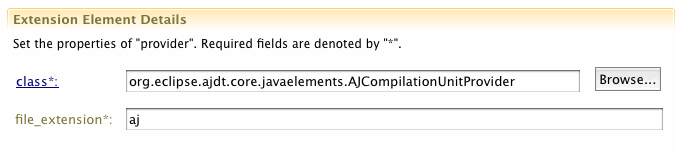
The AspectJ part of the snippet is the same as before. The difference is in the advice body. Instead of calling the AJCompilationUnitProvider factory method directly, there is a call to the CompilationUnitProviderRegistry, which has a mapping from file extensions to ICompilationUnitProviders. A plugin can register its own ICompilationUnitProvider by using the org.eclipse.contribution.weaving.jdt.cuprovider extension point. It looks like this:


One benefit of this implementation is that it extends JDT behavior in a way that uses common Eclipse mechanisms—the extension point. This allows other plug-ins to extend in a well-defined and structured manner. This is the approach that the Scala development tools has chosen to follow, and other language development tools are on the way.

A second of the benefit of this approach is that the consumer of the org.eclipse.contribution.weaving.jdt.cuprovider extension point does not need to be aware of the underlying aspect-oriented implementation. From the consumer's point of view, this extension point can be extended just like any other extension point. No understanding of AspectJ or AOP is required to actually use this extension point.

This is how it is possible to make JDT extensible to other languages in a simple and structured way. However, experienced AspectJ programmers may be confused at this point. Eclipse is built on an OSGi framework. Compile time weaving is not possible because JDT is already installed on a user's machine by the time AJDT is installed. And load time weaving is not possible because it cannot handle an OSGi environment. In a future post, I will describe the Eclipse Weaving Service, which is built on top of Equinox Aspects, that allows plugins to weave into Eclipse.

Wednesday, February 4, 2009

JDT won't do that!

AspectJ is a language that is very close to Java, but it isn't Java. One might expect that since AspectJ is an extension of Java, Eclipse tooling for AspectJ would just be an extension of the Java Development Tools. But it's not that easy. This post describes the problems that we have faced when integrating AspectJ tooling into Eclipse, and motivates a solution that I will elaborate on in future posts.

JDT has not been engineered to be extensible, and rightly so. It is a set of tools that are finely tuned towards making the Java development experience as smooth and convenient as possible. Focusing on extensibility would be to the detriment of the JDT users who program in Java only.

However, this makes life difficult for us tool developers. Users expect high quality tooling for Java-like languages (i.e., languages that run on the JVM) because that is the bar set by JDT. Furthermore, they want tooling that integrates seamlessly with Java tooling. But, JDT won't do that! So, how can we provide good programmer experience in AJDT?

We want to make editing AspectJ look and feel as much like editing Java where it makes sense, and at the same time provide additional functionality so that the user is aware of AspectJ-specific issues. Up until AJDT 1.6.2, there have been limited options to integrate with JDT.

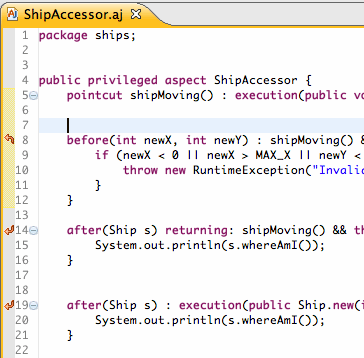
One example of successful integration is the AspectJEditor, which behaves mostly like JDT's CompilationUnitEditor, providing eager error detection, syntax highlighting, content assist, some refactoring support, etc.


The AspectJEditor should be a subclass of the CompilationUnitEditor, But the CompilationUnitEditor is not public API and AJDT really shouldn't be touching it. Or, at least, the responsibility is on us to maintain compatibility in future versions. In addition to using private APIs, the AspectJEditor uses some reflection to access private fields of its super class and copies some code, where reflection isn't practical. Through this combination of techniques, we have been able to largely implement JDT's behavior in AJDT. But, there is some functionality that we want AJDT to provide, but is not possible using private APIs, reflection, or code copying.

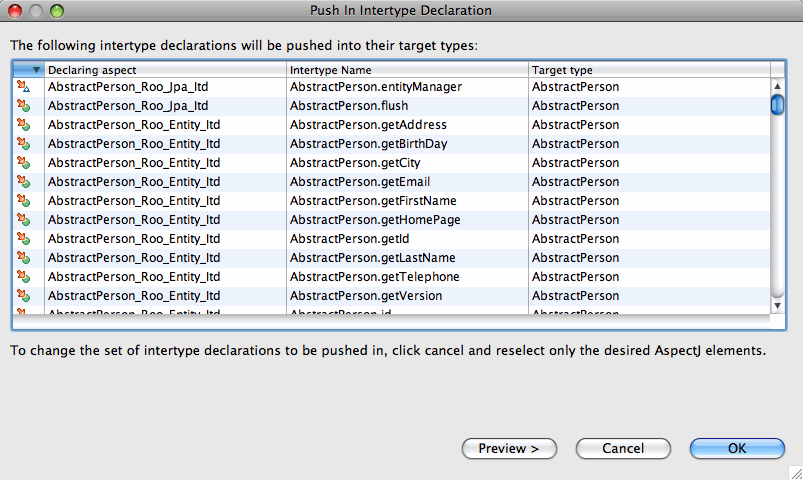
Let's take a look at the Open Type Dialog.


We would really like to see our aspect types in the standard Java Open Type Dialog. But this is unfortunately not possible. There is no API (public or private) that we can use to do this. Even the use of reflection or code copying will not help. What we really need is to gain access to JDT's Java indexer and somehow convince it to index aspect files.

This is a big problem, and one that we have run into many times during our development of AJDT. JDT is not engineered to be compatible with Java-like languages. But, tools for languages such as Groovy, Scala, and JRuby are gaining in popularity and require the same kind of JDT integration that is just not available. There is a long standing JDT bug to address this, but it does not seem like it will be fixed any time soon.

However, there is a solution! Since AJDT 1.6.2, we have been able to provide deep integration with JDT by using AspectJ on JDT itself. We are using Equinox Aspects to weave into the platform and expose functionality in a structured way through the use of Eclipse extension points. In future posts, I will describe how we have designed our JDT weaving service to expose otherwise inaccessible functionality in JDT and how this weaving service is generic enough to be used by tool developers for other languages.

You can also hear more about this at my EclipseCon talk: Aspects Everywhere: Using Equinox Aspects to Provide Language Developers with Deep Eclipse Integration.