Saturday, May 15, 2010

Extending Groovy-Eclipse for use with Domain-Specific Languages Part II

A while ago, I wrote an article about how to extend Groovy-Eclipse for domain specific languages. It was always my intention to write a follow-up that included an example project. Thanks to some prodding on the mailing list, here it is, 5 months later. I finally have an example Groovy-Eclipse extension project available.

The code mostly speaks for itself, so if you are interested in how to extend Groovy-Eclipse, first read part I of this article, and then download the example project.

Here is the example plugin project that extends Groovy-Eclipse. Import this plugin into your Eclipse development workspace.

And here is a simple runtime project that uses all of the extensions provided in the plugin project. Import this project into your Eclipse runtime workspace. If you want to create your own project that uses this example, be sure to add the following project nature to your .project file:
org.codehaus.groovy.eclipse.example.nature
Once again, the code speaks for itself, so there is nothing more that I need to say about it. Enjoy!

Monday, May 10, 2010

Vancouver Eclipse Demo Camp 2010

The Vancouver Eclipse DemoCamp is on once again! This year, it is sponsored
by the Eclipse foundation ( http://eclipse.org ), Tasktop Technologies (
http://tasktop.com ), and others (see p.s.).   This June 29 come out and showcase your Eclipse
based products/tools/research to a crowd of local enthusiasts in a casual
environment. If you are interested in giving a short (10min) presentation,
please send us an email and add yourself to the wiki.

Those who just want to stop by for a beer and see what cool new Eclipse
based technology is being developed in your home town, please register by
adding your name to the wiki as well.

Date: June 29th 6:30pm
Location: TBD  (Likely Robson Square as usual)
After party: 8:00 (location TBD)
Keep an eye on the wiki page to see the finalized schedule

Last year, we had a great turnout with over 50 attendees and some amazing
demos.  It's an excellent opportunity to get to know the local Eclipse
community.  Hope to see you there!

Thanks,

Robert (Tasktop) and Andrew (SpringSource, a division of VMWare)

p.s. - In previous years, the event was fully funded by the Eclipse foundation, but
this year (in part, due to the world-wide success of these events), the
foundation no longer has the budget to provide the same level of funding. 
We are therefore looking sponsorship from the community. If your
company would like to foster the Vancouver Eclipse community, provide extra
branding for the event, and a dedicated speaker slot, please contact us. 

Monday, April 12, 2010

Groovy-Eclipse for Helios

Today we released our first snapshot of a Groovy-Eclipse build for Eclipse 3.6 (Helios). We haven't set the continuous build system up yet, so for now if you are looking to try it out, you can download the zip here:

http://dist.codehaus.org/groovy/distributions/greclipse/snapshot/e3.6/groovy-update-site-e36.zip

And then point your p2 installer to the downloaded archive. You will then be able to install Groovy-Eclipse. We have only tested on 3.6 M6 and we will continue to ensure that it works on later milestones as they come out.

As always, your feedback is appreciated!

EDIT (June 30, 2010): the zip above is outdated and so I removed it. Please use the update site below instead:

http://dist.codehaus.org/groovy/distributions/greclipse/snapshot/e3.6/

Friday, March 26, 2010

AJDT-PDE builds Redux

AspectJ-aware PDE builds in AJDT have always been a bit of a kludge. So, I'm happy to say that as of Eclipse 3.6 (Helios), things will be changing for the better and AJDT will rely on a different mechanism to perform PDE builds.

PDE, or the Plugin Development Environment, is the tool set that helps developers build plugins for the Eclipse platform itself. In Eclipse 3.5 and earlier, AJDT shipped with its own version of the PDE tools (AJDT-PDE) that were largely a copy of Eclipse's PDE, but with a few key changes so that a different compiler could be plugged in. It is an understatement to say that this was inefficient. The AJDT-PDE had to be re-created for each point release of Eclipse so that it could be re-based off of the new version of PDE. This process was fallible and inevitably, some features of PDE were missing or broken in AJDT-PDE.

I have been working with the PDE team to create a more sustainable solution to AspectJ-aware PDE builds. From AJDT for Eclipse 3.6 and onwards, the AJDT-PDE will be removed. The AspectJ-aware export wizards will be deprecated and the org.eclipse.ajdt.pde.build plugin will be redundant. Instead, users can use the standard PDE build, with the following changes to the build.properties file of your plugin project:

# required
compilerAdapter=org.eclipse.ajdt.core.ant.AJDT_AjcCompilerAdapter
sourceFileExtensions=*.java, *.aj

# optional
compilerArg=-aspectpath other.jar


The first line specifies that the AspectJ compiler should be used instead of the Java compiler. The second line specifies what file types should be considered source files. And optionally, you can specify a number of command line arguments using the compilerArg property. Only AspectJ-specific arguments like inpath and aspectpath need to be specified here. For all standard Java options, like source and target you can use the standard PDE-Java options javacSource and javacTarget.

From here, you can use the standard PDE export wizards or PDE headless build scripts to build your project. That's it. There is now nothing special needed for AspectJ-aware PDE builds.

Furthermore, it is possible to create your own compiler adapter so that you can use your own custom compiler for your own JVM language (and avoid using javac). You need to do the following:


  1. Implement org.apache.tools.ant.taskdefs.compilers.CompilerAdapter and delegate to the compiler of your choice

  2. Ensure that this new compiler adapter is on the ant classpath. I recommend using a org.eclipse.ant.core.extraClasspathEntries extension point so that your plugin automatically contributes the classpath to Eclipse's ant runtime. But, you could also specify it in your global ant classpath properties page.

  3. In your build.properties file, fill in the proper values for the compilerAdapter, the sourceFileExtensions, and the compilerArg properties.


That's really all there is to it. For all the gory details on how this works see Bug 303960.

Friday, March 19, 2010

Groovy-Eclipse 2.0.1 Released and see you at EclipseCon!

We are proud to release to announce the release of Groovy-Eclipse 2.0.1. This release is primarily a service refresh of 2.0, but there are a couple of interesting new features including debug stack frame filtering and Eclipse 3.5.2 support. You can read the New and Noteworthy.

The update site for the release is here:
  http://dist.springsource.org/release/GRECLIPSE/e3.5/
This is also a good time to promote my talk at EclipseCon. I will be speaking about Groovy-Eclipse on Wednesday, March 24 at 2pm.

Getting Groovy with Eclipse: Next Generation Tool Support for Dynamic Languages. Come hear how Groovy-Eclipse has extended the JDT compiler to provide deep integration between Groovy and Java. Also hear about how Groovy-Eclipse provides editing support for Groovy's dynamicism through type inferencing.

See you at EclipseCon!

Wednesday, March 17, 2010

AJDT for Helios now available

Just a quick note to let you know that AJDT targeting Helios (Eclipse 3.6) is now available from the following update site:
  http://download.eclipse.org/tools/ajdt/36/dev/update
AspectJ-aware PDE export facilities are currently broken. I am not planning on fixing it. Instead, I have been working with the PDE team on an alternative solution. See Ability to override javac task during pde builds (Bugzilla). I'll write more about this later, but the solution is much more elegant than what is currently available in AJDT for 3.5 and earlier.

Also, as a bonus, this version includes intertype declaration (ITD) -aware Java search. Finally, ITDs are completely first-class citizens in the workspace. I'll write more about this later, too.

Friday, March 5, 2010

Intertype Declaration support in Java projects

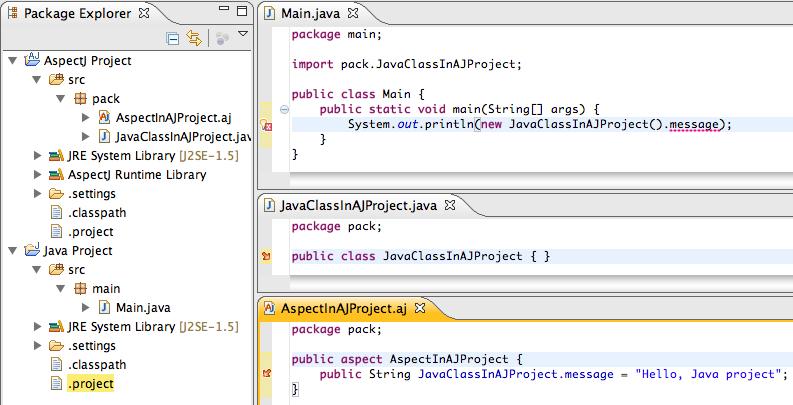
A user recently had a problem with Roo and AspectJ. This particular user had a Roo project being referenced by a regular Java project. Roo is a rapid application development tool for Java. It makes heavy use of AspectJ's Intertype Declarations (ITDs). So, all Roo projects re AspectJ projects. And here is where the problem is. When an AspectJ project makes use of ITDs, Java projects that reference it cannot reference the ITDs without errors. Well actually, the Java projects compile and run correctly, but there are spurious error messages that appear in the editor, and ITDs do not appear in content assist.

A simplified version of this problem is below:

fail

Here, there are two projects, an AspectJ project and a Java project. The AspectJ project has an aspect that declares an ITD on a Java class. This Java class and its ITD is then referenced in the Java project. Even though the Java project compiles and runs correctly, an error appears in the editor.

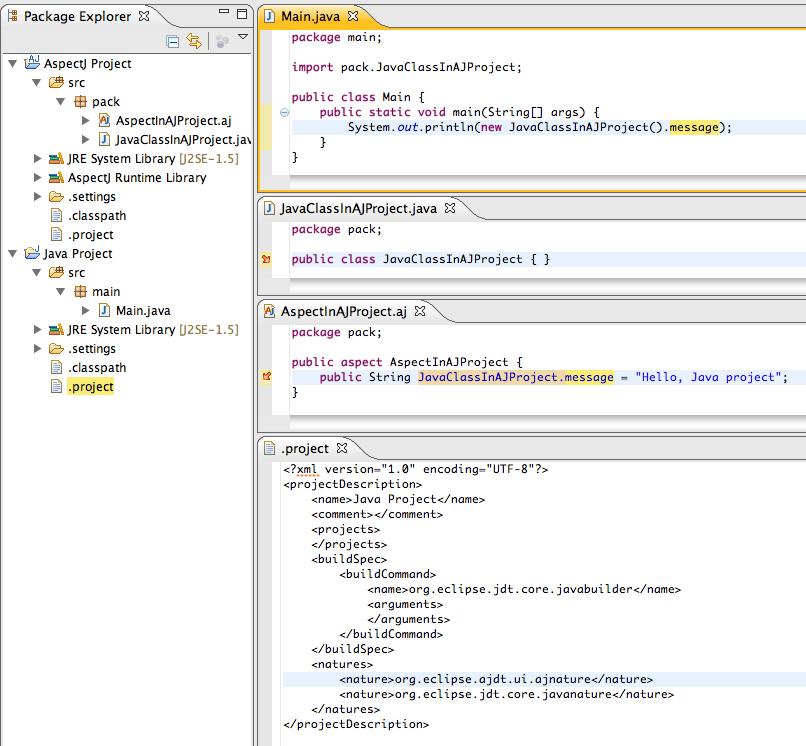
Thankfully, there is a simple fix to this. Open up the .project file for the Java project and add the following line to the nnatures element:
  <nature>org.eclipse.ajdt.ui.ajnature</nature>


(Note: this line should be the first nature if you want the AJ decorator to appear on the project icon.)

What this does is tell AJDT that this project should be treated like an AspectJ project, but it does not change the compiler, so the Java compiler is still used. The result is that ITDs are now correctly recognized in the editor:

success

In the future, I'll probably add a quick fix or some other automated way of doing this in future releases of AJDT, but for now this manual process is a reasonable workaround.